For a long time TimeTackle ran the way most small SaaS products end up running: a handful of always-on services, each sized for the busiest hour of the week, billed every hour of every week. The busiest hour for a calendar analytics product is Monday morning, when everyone’s calendars sync at once. The quietest is Saturday night. We were paying for Monday morning all weekend.
This post is about how we moved those services to Cloud Run and cut our GCP spend by about 50%, and the handful of design changes that mattered more than the platform switch itself.
What we were running
The shape was simple. An API service behind a load balancer, a scheduler service that woke up every minute to decide what needed syncing, and a pool of workers that did the actual calendar and CRM syncs. Everything sat on top of Cloud SQL.
Three things made it expensive:
- Minimum instances everywhere. Each service kept warm instances so the first request of the morning wasn’t slow. Reasonable for the API. Wasteful for everything else.
- A scheduler that polled. Every minute it queried the database for “accounts due for sync”, found nothing most of the time, and logged that it had found nothing. That loop ran 1,440 times a day per environment.
- Workers sized for peak. Sync load is spiky. The worker pool was big enough for Monday and idle for most of the rest.
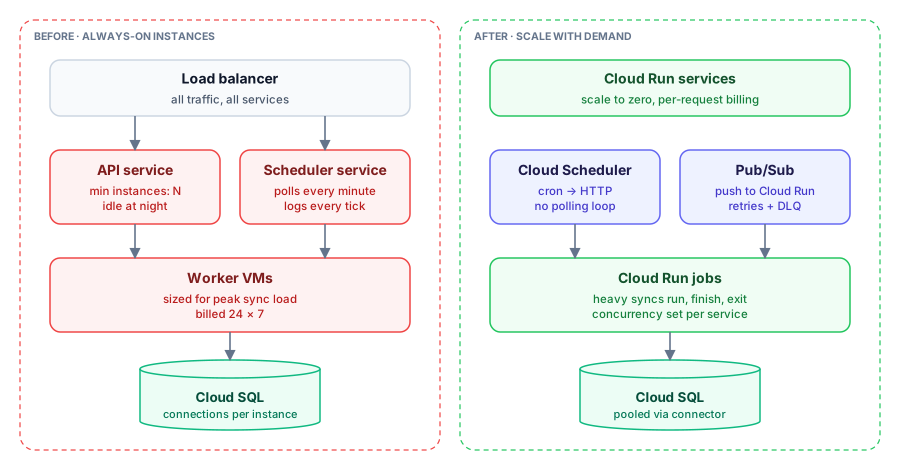
The plan: stop paying for idle
Cloud Run bills per request (or per instance-second when you allocate CPU always). That only saves money if your services are actually idle sometimes, so the real work was making them idle.
1. Split by traffic shape, not by codebase
We had been deploying by repository. We started deploying by traffic shape instead:
- Latency-sensitive HTTP (the API the web app calls): Cloud Run service, a small number of minimum instances during business hours, scale out on concurrency.
- Bursty background work (calendar and CRM syncs): Cloud Run jobs or services that scale to zero.
- Scheduled triggers: no service at all. Cloud Scheduler calls an HTTP endpoint.
The same code can run in more than one of these. A sync handler is a sync handler whether it’s called from a push subscription or a job.
2. Replace polling with push
The scheduler loop became Cloud Scheduler jobs that publish to Pub/Sub, and Pub/Sub pushes to Cloud Run. The “is anything due?” query moved into the triggered handler, which runs a few times an hour instead of every minute, and fans out one message per account that actually needs work.
// Called by Cloud Scheduler (via Pub/Sub push) a few times an hour.
export async function dispatchDueSyncs(req: Request, res: Response) {
  const due = await accounts.findDueForSync({ limit: 500 });

  // One message per account: Pub/Sub gives us retries and a dead-letter
  // topic for free, and each account sync scales independently.
  await Promise.all(
    due.map((a) =>
      pubsub.topic("account-sync").publishMessage({
        json: { accountId: a.id, reason: "scheduled" },
        attributes: { idempotencyKey: `${a.id}:${a.nextSyncWindow}` },
      }),
    ),
  );

  res.status(204).end();
}
Two details matter here. The idempotency key means a duplicate delivery from Pub/Sub doesn’t run a second sync for the same window. And the push endpoint returns quickly; the heavy work happens in the subscriber, not the dispatcher.
3. Set concurrency deliberately
Cloud Run’s default concurrency (80 requests per instance) is fine for an API that mostly waits on the database. It is wrong for a sync worker that holds a lot of memory per request. We set concurrency per service: high for the API, low single digits for the sync handlers. Getting this wrong in the other direction is how you end up with out-of-memory restarts that look like random failures.
4. Protect the database
Scale-to-zero has a sharp edge: scale-from-zero. When Monday arrives and fifty instances spin up, each opens its own database connections. We put a hard ceiling on instance count per service, used the Cloud SQL connector with a small pool per instance, and did the arithmetic: max instances × pool size must fit under the database’s connection limit with headroom for migrations and admin access.
What actually moved the bill
Roughly in order of impact:
- Removing minimum instances from everything that wasn’t the user-facing API.
- Scale-to-zero on workers, so the weekend costs close to nothing.
- Killing the polling loop, which also cut a surprising amount of Cloud Logging ingestion. Logging every empty tick adds up. (We later went further and trimmed logging on the scheduler hot paths, which cut log ingestion by about half on its own.)
The total came out at roughly half of what we had been paying.
Things I would tell someone doing this
- Measure idle before you migrate. If your services are busy 24 hours a day, Cloud Run with always-allocated CPU may cost the same or more. The savings come from idle time.
- Cold starts are a product decision. For the API we kept a minimum instance during working hours. For background work nobody notices a two-second cold start.
- Make every triggered handler idempotent. Push delivery is at-least-once. If running a handler twice causes a problem, you’ll find out in production.
- Budget alerts on day one. A misconfigured max-instances setting can turn a cost project into a cost incident.
None of this needed a rewrite. Most of the work was looking honestly at how each service was used, and deploying it to match.